
Introduction
Download free word document templates to create professional business documents without starting from a blank page. These templates provide ready-made layouts for business plans, invoices, reports, proposals, meeting notes, letters, and other everyday documents. Whether you run a small business, work as a freelancer, manage a team, or are starting a new company, Microsoft Word templates can help you organize information and present it clearly.
A well-designed document makes important information easier to understand. Instead of spending hours adjusting headings, margins, fonts, and spacing, you can choose a suitable template, replace the sample content, and customize the layout for your needs.
In this guide, you will learn what Word document templates are, where to find free options, which templates businesses commonly need, how to download and customize them, and what to check before using a template for professional work.
What Are Free Word Document Templates?
Free Word document templates are pre-designed files that provide a structure for creating documents in Microsoft Word or compatible word-processing applications. They commonly use the DOCX format, although some older templates may use DOC.
A template can include headings, tables, page layouts, placeholders, formatting styles, and sample text. You can replace these elements with your own information instead of designing the entire document yourself.
For example, a business proposal template might include sections for an introduction, project objectives, pricing, delivery timelines, and terms. You simply enter your business details and adapt the content to the project.
How Do Word Templates Work?
Word templates work as reusable starting points for documents. Depending on the file format, you can open a template directly or save a copy before editing it.
Most templates allow you to change:
- Business names, logos, and contact information
- Headings, paragraphs, fonts, and colors
- Tables, lists, and page layouts
- Dates, prices, project details, and other information
- Headers, footers, and page numbers
The main benefit is convenience. You can maintain a consistent appearance across business documents while spending more time on the information that matters.
Best Types of Free Word Document Templates for Businesses
Businesses need different documents for sales, administration, planning, communication, and recordkeeping. The most useful template depends on your work and the information you need to present.
1. Business Plan Templates
A business plan template helps you explain your company’s goals, target market, products or services, operating model, and financial expectations.
It is useful for entrepreneurs preparing to launch a business, existing companies reviewing their direction, and professionals presenting a business concept to potential partners.
A practical business plan template may contain:
- Executive summary
- Company overview
- Products and services
- Market and competitor analysis
- Marketing strategy
- Operations plan
- Financial projections
- Business goals and milestones
Choose a template that provides enough room for your research and financial information. A simple layout is often easier to maintain than a complicated design with unnecessary sections.
2. Invoice Templates
An invoice template helps businesses request payment for products or services. It provides a structured place for transaction details and makes billing documents easier to prepare.
A useful invoice template usually includes the seller’s information, customer details, invoice number, issue date, payment due date, item descriptions, quantities, prices, and total amount.
Depending on your business and location, you may also need tax details, payment instructions, or other legally required information.
Before sending an invoice, double-check calculations, customer details, payment terms, and the due date. A template improves presentation, but it does not automatically guarantee accounting or tax compliance.
3. Business Proposal Templates
A business proposal template helps you explain how your services or products can address a customer’s needs.
Freelancers, agencies, consultants, and service providers can use proposals to communicate project scope, deliverables, pricing, and timelines.
A professional proposal often includes:
- Client requirements and project overview
- Proposed solution
- Scope of work
- Deliverables and deadlines
- Pricing and payment terms
- Relevant experience
- Next steps and contact information
For example, a digital marketing agency could use a proposal template to describe SEO services, content planning, link-building activities, reporting, and project costs.
Customize every proposal for the intended client rather than sending the same generic document to everyone.
4. Business Report Templates
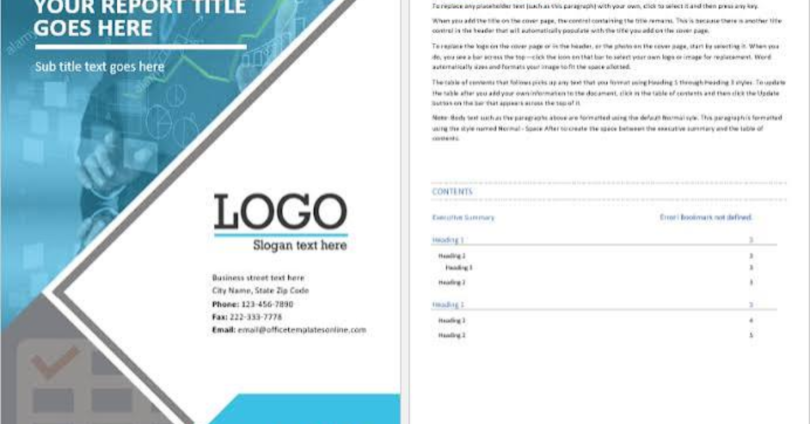
A business report template organizes information into a readable format. It is useful for performance reviews, project updates, sales summaries, research findings, and internal business analysis.
Common sections include an executive summary, background, objectives, findings, recommendations, and supporting information.
For reports containing numerical data, use clearly labeled tables and explain what the figures mean. Keep conclusions separate from assumptions so readers can distinguish verified results from interpretations.
5. Meeting Agenda and Minutes Templates
Meeting templates help teams prepare for discussions and record decisions.
An agenda outlines the subjects to discuss, while meeting minutes document what happened, what participants decided, and which actions need to be completed.
A practical meeting template can include:
- Meeting date and time
- Attendees
- Discussion topics
- Key decisions
- Assigned responsibilities
- Deadlines and follow-up tasks
These templates are especially useful for remote teams and businesses that need a clear record of project discussions.
6. Business Letter Templates
Business letter templates help professionals communicate in a formal, organized style. They can be used for client correspondence, service inquiries, partnership requests, complaints, and official notices.
A standard business letter generally contains the sender’s details, date, recipient information, subject or purpose, greeting, main message, closing, and signature.
Choose a design that matches the recipient and purpose. A simple, readable letter is often more appropriate for formal communication than a heavily decorated layout.
7. Resume and Cover Letter Templates
Resume and cover letter templates help job seekers present their qualifications, skills, experience, and achievements in a consistent format.
A resume template may include professional experience, education, skills, certifications, and contact details. A cover letter template provides space to explain why the applicant is interested in a specific role.
Use clear headings and relevant information. Avoid unnecessary graphics or complicated layouts that make the document difficult to read or process through recruitment software.
Where Can You Download Free Word Document Templates?
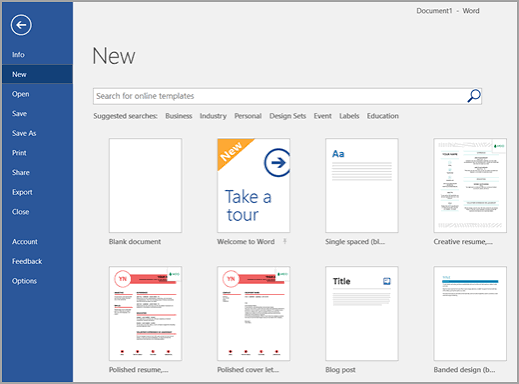
Several established sources offer free templates or document layouts. Availability, licensing, and download requirements can vary, so check the terms for the specific file you choose.
Microsoft Create
Microsoft Create offers templates for various productivity and design needs, including Word-compatible document templates.
You can explore layouts for business documents, letters, reports, resumes, and other common tasks.
Visit the official website: https://create.microsoft.com/
Look for a template that matches your purpose, open it using the available option, and follow the instructions for editing or downloading it.
Google Docs Template Gallery
Google Docs provides templates for creating documents online. Although its native files are designed for Google Docs, you can download compatible documents in Microsoft Word format when that option is available.
This can be useful if you work online and want to edit a document before sharing it with someone who uses Microsoft Word.
Visit: https://docs.google.com/document/
Select a template, customize its content, and use the available download options to obtain a Word-compatible file.
Vertex42
Vertex42 provides a range of downloadable templates, including business forms, schedules, budgeting tools, and other office documents. Some resources are designed for Microsoft Word, while others are intended for Excel.
Visit: https://www.vertex42.com/
Check the file format and licensing details before downloading. Choose a Word template when you need an editable text document rather than a spreadsheet.
Other Template Websites
Other websites may provide free business forms, letters, agreements, and document layouts. Before downloading from an unfamiliar source, review the website’s reputation, file type, usage permissions, and any restrictions.
Avoid websites that require unnecessary software installations or ask you to disable security protections to access a document.
How to Download and Use Free Word Document Templates
Downloading and editing a template is usually straightforward. The exact steps depend on the website and the application you use.
Step 1: Identify Your Document Requirements
Decide what you want to create before searching for a template.
For example, if you need to present your services to a potential client, look for a business proposal template. If you need to track payments, choose an invoice template.
Think about the intended reader, required information, document length, and whether you need to print or share the file electronically.
Step 2: Choose a Reliable Template Source
Visit a trusted provider and search for the document type you need.
Use specific search phrases such as:
- Free Word business plan template
- Downloadable invoice template DOCX
- Free project report template for Word
- Professional business proposal template
- Editable meeting minutes template
Specific searches can help you find relevant layouts more quickly.
Step 3: Download the Correct File Format
Check whether the template is available as a DOCX or DOC file.
DOCX is the modern Microsoft Word document format and is generally the preferred option for new documents. DOC is an older Word format that may be useful for compatibility with older software.
If the website offers a template in PDF format only, remember that a PDF may not be as easy to edit as a Word document.
Step 4: Open the Template in Word
Locate the downloaded file and open it in Microsoft Word or another compatible word processor.
If you receive a warning that the document was downloaded from the internet, check that the source is trustworthy before enabling editing or other restricted features.
For reusable templates, save a separate copy of the file before making changes. This helps preserve the original layout for future use.
Step 5: Customize the Content
Replace sample text and placeholders with your own information.
Add your business name, contact details, relevant headings, project information, prices, and dates. Remove sections you do not need, but keep any important information required for the document’s purpose.
Use consistent formatting throughout the document. Keep headings easy to recognize and make sure tables and paragraphs are properly aligned.
Step 6: Review and Save Your Document
Read the completed document carefully before sending it to anyone.
Check spelling, grammar, calculations, links, dates, and contact information. Confirm that the layout looks correct in print preview if you intend to print the document.
Save an editable Word version for future updates. If the recipient does not need to edit the document, consider exporting a PDF to preserve its appearance across different devices.
Benefits of Using Free Word Document Templates
Free templates can help businesses produce organized documents without paying for custom layouts or spending unnecessary time on formatting.
Save Time on Document Creation
A template provides a ready-made structure, so you can focus on writing accurate content instead of arranging every element manually.
This is particularly useful for documents you create frequently, such as invoices, proposals, letters, and project reports.
Maintain Consistent Branding
Businesses can customize templates with their logos, brand colors, fonts, and contact information.
Using similar formatting across different documents helps customers recognize your business and gives communications a more consistent appearance.
Improve Readability
Well-organized templates use headings, spacing, and sections to make information easier to scan.
Readers can find important details more quickly when the document follows a logical structure.
Reduce Formatting Errors
Templates can provide consistent margins, heading styles, tables, and page layouts. They reduce repetitive formatting work, although you should still check the final document for errors.
Support Small Businesses and Freelancers
Free templates are useful for businesses working with limited budgets. Freelancers can prepare proposals, quotations, invoices, and project summaries without needing to design every document from scratch.
However, a free template may still require significant customization to meet the needs of a specific business.
Limitations of Free Word Document Templates
Free templates are convenient, but they are not suitable for every situation.
Some designs may look generic or may not match your brand. Others may contain unnecessary sections, outdated formatting, or sample content that does not apply to your work.
Certain templates may also require a paid subscription, an account, or permission to use them commercially.
Legal, financial, and HR documents deserve particular attention. A template is not a substitute for professional advice or a review of applicable laws and regulations.
Before using a template for important business purposes, verify that its content is appropriate, its permissions allow your intended use, and all required details are included.
Tips for Choosing the Right Business Word Template
The right template should make your information clearer, not more complicated.
Choose Functionality Over Decoration
A professional document should prioritize readability. Avoid excessive colors, decorative elements, and unnecessary graphics that distract from the content.
Check Compatibility
Make sure the template works with your version of Microsoft Word or your chosen word processor. Some advanced formatting features may look different in other applications.
Review Commercial Usage Rights
Free to download does not always mean free for every type of use. Review the license, especially if you plan to use the template for client work, distribute it, or incorporate it into a commercial product.
Protect Business Information
Only download files from sources you trust. Keep confidential client details, financial information, and internal business records secure.
Do not enter sensitive information into an unfamiliar online editor unless you understand how the service handles and protects your data.
Keep Your Documents Organized
Use descriptive file names and separate folders for invoices, proposals, reports, and other business records.
For example, a file name such as ClientName_Proposal_2026-10.docx is easier to identify than Document1.docx.
A consistent naming system makes it simpler to locate files and manage revisions.
Common Mistakes to Avoid When Using Word Templates
Even a well-designed template can produce a poor result if it is used carelessly.
Leaving placeholder text: Remove instructions such as “Insert Company Name Here” and replace all sample information before sharing the document.
Using the wrong template: An invoice layout is not a substitute for a detailed proposal. Choose a document structure that matches the task.
Ignoring formatting problems: Review page breaks, table alignment, fonts, headers, and footers after editing.
Forgetting to verify calculations: Check totals, quantities, taxes, and payment details independently.
Overlooking licensing terms: Confirm that you have permission to use and modify the template for your intended purpose.
Sharing the wrong version: Check the file name and contents before sending a document, particularly when working with multiple clients.
Relying on a template for legal compliance: Review legal, tax, employment, or contractual documents against the applicable requirements before using them officially.
Frequently Asked Questions
1. Where can I download free Word document templates?
You can find free Word document templates through Microsoft Create, Google Docs, Vertex42, and other reputable template providers. Available categories may include business plans, invoices, reports, resumes, proposals, and letters. Check each template’s file format, download requirements, and usage license before using it for business purposes.
2. Are free Word document templates editable?
Yes, most DOCX and DOC templates can be edited using Microsoft Word and compatible word-processing software. You can usually change text, headings, fonts, tables, colors, and other formatting elements. Some advanced features may behave differently in other applications, so review the finished document before sharing or printing it.
3. Can I use free Word templates for commercial purposes?
Some free templates allow commercial use, while others have restrictions. The answer depends on the license provided by the template creator or website. Before using a template for client projects, business operations, or commercial distribution, read its terms carefully and obtain permission if the intended use is not covered.
4. Which Word templates are most useful for small businesses?
Small businesses commonly benefit from invoice, quotation, business proposal, business plan, meeting minutes, report, and business letter templates. The most useful options depend on the company’s activities. Service providers may need proposals and invoices regularly, while managers may rely more on reports, planning documents, and meeting records.
5. Can I download Word templates without Microsoft Word?
In many cases, yes. You can use compatible word processors, such as LibreOffice Writer, to open and edit supported Word documents. Google Docs can also work with compatible files and offers a Word-format download option. However, some layouts, fonts, or advanced formatting features may change between applications, so check compatibility before sharing the final file.
Conclusion
Downloading free Word document templates is a practical way to create professional business documents without designing every page from scratch. From business plans and invoices to reports, proposals, and formal letters, the right template can save time, improve readability, and help maintain consistent branding.
Start by identifying the document you need, choose a reliable template source, and download an editable file in a suitable format. Customize the content, check the license, review the final layout, and verify all important information before sharing it.
For your next business document, begin with Microsoft Create or another reputable template provider. Select a simple layout that fits your purpose, add your business details, and save a clean copy that you can reuse when needed.