
Introduction
Merge PDF Files Online Free tools help businesses, freelancers, students, and professionals combine multiple PDF documents into one organized file without paying for expensive software. Whether you need to join invoices, merge business reports, combine contracts, or prepare a professional presentation, an online PDF merger can simplify the process.
PDF files are widely used because they preserve document formatting across different devices and operating systems. However, managing several separate PDFs can become inconvenient when documents need to be reviewed, shared, printed, or stored together.
This guide explains how to merge PDF files online free, how online PDF merger tools work, which features to consider, and how to protect sensitive business information. You will also learn about the benefits, limitations, common mistakes, and practical ways to combine PDFs efficiently.
What Does It Mean to Merge PDF Files Online Free?
Merging PDF files means combining two or more separate PDF documents into a single PDF file. An online PDF merger allows you to complete this task through a web browser, often without installing software.
For example, a small business might have separate PDFs for a quotation, invoice, product catalog, and terms of service. Instead of sending four attachments to a customer, the business can combine them into one organized document.
The resulting PDF is generally easier to distribute, review, print, and archive.
How an Online PDF Merger Works
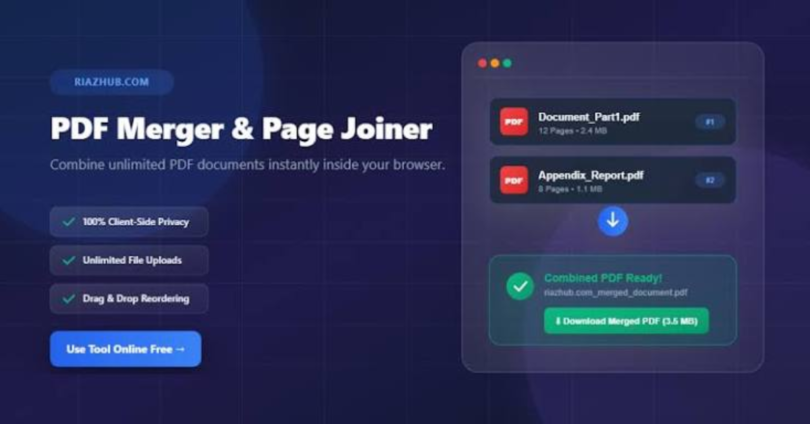
Most online PDF merger tools follow a similar process:
- Upload the PDF documents you want to combine.
- Arrange the files in the required order.
- Select the merge or combine option.
- Wait for the tool to process the documents.
- Download the combined PDF and check the final result.
Some tools also provide options for rotating pages, deleting unwanted pages, compressing files, or rearranging documents before merging.
The exact features, file-size limits, and privacy protections depend on the service you choose.
Why Businesses Need to Merge PDF Files
Businesses regularly exchange digital documents with customers, employees, suppliers, and partners. Combining related PDFs can make these exchanges more organized and professional.
1. Simplify Business Document Management
When related information is scattered across multiple files, finding the correct document can take extra time. Merging related PDFs creates a single reference file that is easier to name, store, and retrieve.
For example, a project manager can combine a project proposal, approved budget, meeting summary, and project schedule into one PDF for internal review.
2. Improve Customer Communication
Sending one well-organized PDF can be more convenient than sending multiple attachments in a single email.
A service provider could combine a quotation, company profile, service details, and payment terms into one document. Customers can review the information in sequence without opening several separate files.
3. Keep Invoices and Receipts Organized
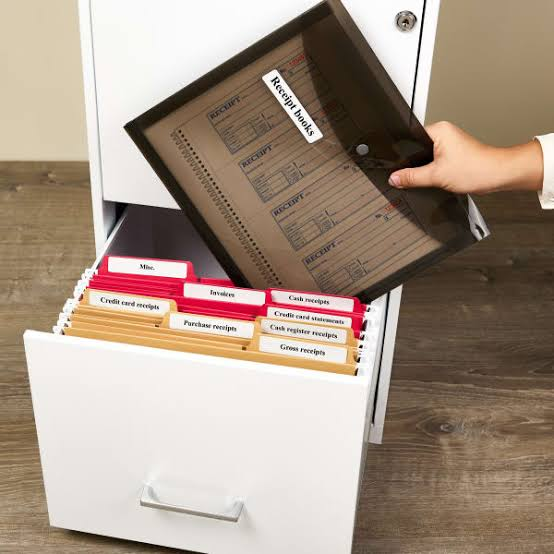
Accounting teams often need to maintain records of invoices, receipts, purchase orders, and supporting documents.
Combining relevant PDFs can help create a convenient record for a particular transaction or reporting period. However, businesses should follow their accounting procedures and retain original records whenever required.
4. Prepare Professional Reports
Reports often include information from different sources, such as charts, written summaries, appendices, and supporting documents.
A PDF merger can bring these materials together into a single report. Before sharing the final file, check the page order, readability, and consistency of the document.
5. Reduce Email Attachment Clutter
Multiple attachments can make an email harder to navigate. Combining related documents can simplify the message and make the recipient’s next steps clearer.
Keep in mind that merging PDFs does not necessarily reduce their file size. If the combined document is too large to send, you may need a separate PDF compression tool.
How to Merge PDF Files Online Free Step by Step
You can usually combine PDF documents in a few minutes using a browser-based tool. The process is straightforward, even for people who do not have advanced technical skills.
Step 1: Choose a PDF Merger Tool
Select an online PDF merger that supports the number and size of files you want to combine.
Look for useful features such as:
- A simple upload interface
- File reordering before merging
- Support for multiple PDFs
- Clear download instructions
- Transparent privacy and file-retention policies
- No unexpected payment requirement for the features you need
Do not assume that every tool advertised as free offers unlimited use. Some services impose restrictions on file size, the number of documents, or daily tasks.
Step 2: Upload Your PDF Documents
Open the selected tool and choose the PDF files stored on your device.
Depending on the service, you may be able to select multiple files at once or add documents individually. Check that every required file has uploaded successfully before continuing.
If a file fails to upload, confirm that it opens normally on your computer and that it is a valid PDF document.
Step 3: Arrange the Files in the Correct Order
The order of your documents matters because it determines how the combined PDF will be organized.
For a business proposal, a sensible sequence might be:
- Cover page
- Executive summary
- Main proposal
- Pricing information
- Terms and conditions
- Supporting documents
Use the tool’s available controls to move documents into the correct position. Do not rely on the order in which files happen to appear on your computer.
Step 4: Merge the PDF Files
After checking the file order, select the merge, combine, or similar option.
The service will process the uploaded documents and create a single PDF. Processing time can vary depending on the number of files, their sizes, and the capabilities of the service.
If merging fails, try processing fewer files at a time or check whether the documents are damaged or password-protected.
Step 5: Download the Combined PDF
Download the completed document to your computer or another suitable storage location.
Choose a descriptive filename, such as Business-Proposal-October-2026.pdf, instead of a generic name that may be difficult to identify later.
Step 6: Review the Final Document
Always open the merged PDF before sending or storing it.
Check that:
- Every expected document is included.
- The pages appear in the correct order.
- Text, images, and tables remain readable.
- No pages are missing or duplicated.
- Page orientation is correct.
- Sensitive information has not been included accidentally.
This final review helps prevent avoidable mistakes when sharing important business documents.
Best Features to Look for in a Free PDF Merger
The best PDF merger is not necessarily the one with the most features. It is the one that meets your document needs, provides a clear workflow, and handles your files appropriately.
Easy-to-Use Interface
A straightforward interface makes it easier to upload files, rearrange them, and download the finished document. This is especially useful for employees who only need to merge PDFs occasionally.
Flexible File Ordering
File reordering is important when preparing contracts, reports, proposals, or customer documents. Look for a tool that allows you to move files before merging.
If you need to rearrange individual pages rather than entire documents, confirm that the service supports page-level editing.
Clear File-Size Limits
Some free services limit the size or number of PDFs you can process. Check these limits before uploading large reports or collections of scanned documents.
A large scanned PDF may contain many image-heavy pages, which can make it substantially larger than a text-based document.
Privacy and Security Information
Business files may contain customer details, pricing information, signatures, or confidential agreements. Review the service’s privacy policy and understand how uploaded documents are handled.
Prefer tools that clearly explain their storage, deletion, and security practices. If your company handles confidential or regulated information, use a solution approved by your organization.
Additional PDF Tools
Some services combine merging with other features, including compression, page rotation, splitting, and file conversion.
These features can be convenient, but they are not essential for every task. Choose a tool based on the work you actually need to complete.