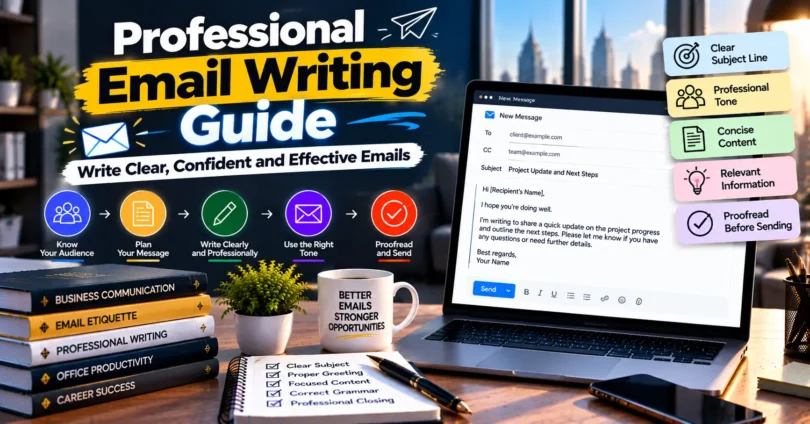

Professional email writing guide principles can help you write messages that are clear, respectful, purposeful, and easy to act on. Whether you are emailing a client, manager, colleague, recruiter, supplier, or business partner, the quality of your message can influence how quickly and accurately the recipient responds.
Professional email writing is not about using complicated vocabulary or sounding excessively formal. It is about communicating the right information to the right person in a structured and appropriate way.
For professionals, students, freelancers, entrepreneurs, and job seekers in India, email remains an important communication channel for job applications, client discussions, project updates, meeting requests, quotations, approvals, and other formal interactions.
This guide explains professional email format, subject lines, greetings, email body structure, closing phrases, etiquette, examples, common mistakes, and practical techniques you can use to improve everyday business communication.
What Is Professional Email Writing?
Professional email writing is the process of creating a formal or business-related email that communicates a specific message clearly, respectfully, and efficiently.
A good professional email usually has a meaningful subject line, appropriate greeting, concise body, clear action or request, suitable closing, and accurate contact information.
Unlike casual messaging, professional email communication should consider the recipient, purpose, business context, tone, grammar, and expected response.
Key Elements of a Professional Email
Most effective business emails contain these elements:
- Clear subject line
- Appropriate greeting
- Brief opening sentence
- Main message or purpose
- Relevant supporting information
- Clear request or next step
- Professional closing
- Email signature
The exact structure can change depending on whether you are writing a job application, follow-up, client proposal, internal update, complaint, introduction, or meeting request.
Why Is Professional Email Writing Important?
Professional email writing is important because it makes communication easier to understand and helps recipients identify what they need to do.
A well-written message also reduces unnecessary back-and-forth communication. Instead of sending several emails to clarify missing details, a properly structured email can provide the necessary context from the beginning.
Benefits of Writing Better Professional Emails
Strong email communication can help you:
- Communicate instructions more clearly
- Create a professional impression
- Reduce misunderstandings
- Make requests easier to understand
- Improve communication with clients and colleagues
- Keep written records of important discussions
- Organise business conversations
- Present proposals and updates professionally
- Save time for both sender and recipient
However, email is not ideal for every situation. Complex disagreements, highly sensitive discussions, emergencies, or conversations requiring extensive explanation may be better handled through a meeting or another suitable communication channel.
Professional Email Format at a Glance
A professional email should generally move from the purpose of the message to the necessary details and then to a clear next step.
| Email Element | Purpose | Example |
|---|---|---|
| Subject | Explains what the email concerns | Project Update – Website Redesign |
| Greeting | Addresses the recipient | Dear Ms Sharma, |
| Opening | Establishes context | I am writing to share an update on… |
| Main body | Provides essential details | The first phase has been completed… |
| Action | Explains what happens next | Please review the document by Friday. |
| Closing | Ends politely | Kind regards, |
| Signature | Identifies the sender | Rahul Mehta, Marketing Executive |
This basic framework works for many types of business communication.
How to Write a Professional Email Step by Step
The easiest way to write a professional email is to decide what outcome you want before drafting the message.
Ask yourself: What should the recipient understand or do after reading this email?
Once that is clear, follow these steps.
1. Identify the Purpose of Your Email
Every professional email should have one primary purpose.
For example, you may want to:
- Request information
- Confirm a meeting
- Apply for a position
- Follow up on previous communication
- Send a document
- Request approval
- Provide a project update
- Introduce yourself
- Respond to a customer
- Ask for payment or an invoice
If you cannot explain the purpose in one sentence, your email may be trying to cover too many unrelated topics.
2. Write a Specific Subject Line
The subject line should tell the recipient what the email is about before they open it.
Avoid vague subjects such as:
“Hello”
“Important”
“Please Read”
“Update”
Better alternatives include:
“Meeting Request: Q4 Marketing Review”
“Invoice 4587 – Payment Confirmation Required”
“Application for Digital Marketing Executive Position”
“Website Project Update – Content Review Required”
Specific subject lines help recipients understand the context and priority of the message.
3. Choose an Appropriate Greeting
Your greeting should reflect your relationship with the recipient.
Common professional greetings include:
“Dear Mr Rao,”
“Dear Ms Kapoor,”
“Hello Priya,”
“Hi Arjun,”
“Dear Hiring Manager,”
If you know the person’s preferred title or form of address, use it accurately. Avoid assuming titles when you are uncertain.
“Dear Sir/Madam” can still appear in formal correspondence, but a specific name or role is generally clearer when available.
4. Start With a Clear Opening
The first sentence should quickly establish why you are writing.
For example:
“I am writing to confirm our meeting scheduled for Monday.”
“I am contacting you regarding the marketing proposal discussed yesterday.”
“Thank you for sharing the revised project requirements.”
“I am writing to apply for the Business Analyst position advertised on your careers page.”
The recipient should not need to read several paragraphs before understanding the purpose.
5. Write a Concise and Useful Email Body
The body should contain enough information for the recipient to understand the situation without unnecessary detail.
Keep paragraphs short. If you need to communicate several requirements, bullet points can make them easier to scan.
A useful structure is:
Context → Key information → Required action
For example:
“Thank you for reviewing the first draft of the website. We have incorporated the changes discussed during Tuesday’s meeting.
The updated version now includes the revised homepage copy, service descriptions, and contact information.
Please review the updated draft and send your final comments by 4 p.m. Friday.”
The message is short but provides context, progress, and a specific next step.
6. Make Your Request Clear
If you need the recipient to take action, say exactly what you need.
Instead of:
“Please check this.”
Write:
“Please review pages 3–5 and send your comments by 2 p.m. Wednesday.”
Instead of:
“Reply soon.”
Write:
“Please confirm your availability by Tuesday afternoon.”
A precise request reduces uncertainty.
7. Use an Appropriate Closing
Your closing should match the tone of your email.
Common options include:
- Kind regards
- Best regards
- Regards
- Sincerely
- Thank you
- Best
For formal first-time communication, “Kind regards” or “Sincerely” can work well. For established professional relationships, “Best regards” or “Regards” may be appropriate.
8. Add a Professional Signature
A useful business email signature may contain:
Full Name
Job Title
Company Name
Phone Number
Website
Only include information that is relevant and appropriate.
9. Proofread Before Sending
Before clicking send, check the entire email once from the recipient’s perspective.
Review:
- Recipient name
- Email address
- Subject line
- Dates and times
- Names and job titles
- Grammar and spelling
- Links
- Attachments
- Requested action
- Deadline
- Tone
A short proofreading check can prevent embarrassing or costly mistakes.
Professional Email Example
Here is a simple example of a professional project email:
Subject: Website Content Review – Feedback Required by Friday
Dear Ms Patel,
Thank you for reviewing the initial website structure.
We have now completed the revised homepage and service-page content based on the requirements discussed during our meeting. The updated documents are attached for your review.
Please share any final comments by 3 p.m. Friday so that we can proceed with the next stage of the project.
If any section requires clarification, please let me know.
Kind regards,
Amit Verma
Project Coordinator
This email works because the purpose, context, action, and deadline are immediately clear.
How to Write Better Email Subject Lines
An effective subject line should be specific enough to communicate context without becoming unnecessarily long.
Useful patterns include:
Action + Topic:
“Approval Required: October Campaign Budget”
Topic + Deadline:
“Quarterly Report – Feedback by 12 October”
Meeting + Purpose:
“Meeting Request: Vendor Contract Review”
Application + Position:
“Application for Senior Accountant Position”
Follow-Up + Context:
“Follow-Up: Website Development Proposal”
Avoid misleading urgency. Words such as “URGENT” should only be used when the matter genuinely requires immediate attention.
How Formal Should a Professional Email Be?
The appropriate level of formality depends on the recipient, relationship, organisation, and purpose.
A job application to an unfamiliar employer usually requires more formality than an everyday update to a colleague you work with regularly.
Formal Email
Use a more formal style for:
- Job applications
- Official complaints
- Senior executives
- Government or institutional communication
- First-time business contacts
- Formal proposals
Neutral Professional Email
A neutral professional tone works well for:
- Clients
- Suppliers
- Managers
- Project partners
- Cross-team communication
Friendly Professional Email
A slightly more relaxed tone may be appropriate for:
- Familiar colleagues
- Long-term clients
- Internal team communication
Professional does not necessarily mean formal. A message can be warm and conversational while remaining respectful and clear.
Professional Email Etiquette
Email etiquette refers to the communication practices that help keep professional correspondence respectful, efficient, and easy to manage.
Good practices include:
- Use a meaningful subject line.
- Keep unrelated topics in separate emails when necessary.
- Respond within an appropriate timeframe for the context.
- Avoid unnecessary use of “Reply All.”
- Use CC only when the person genuinely needs visibility.
- Check attachments before sending.
- Avoid writing entire sentences in capital letters.
- Use emojis cautiously in professional communication.
- Protect confidential information.
- Confirm important dates and deadlines.
- Keep your tone respectful during disagreements.
The goal is not to follow rigid rules. It is to make communication easier for everyone involved.
Common Professional Email Writing Mistakes
Many weak business emails fail because they make the recipient work too hard to understand the message.
Writing an Unclear Subject Line
A subject such as “Question” provides almost no context.
Use a subject that identifies the actual topic.
Writing Long Introductions
Do not spend several paragraphs reaching the main point. State the purpose early and provide background only when it is useful.
Using Overly Complicated Language
Professional communication should be easy to understand.
Instead of:
“We would like to ascertain whether you would be amenable to participating in the aforementioned discussion.”
Use:
“Please let us know if you are available for the meeting.”
Clear writing usually sounds more confident.
Forgetting the Call to Action
The recipient may understand your message but still not know what you expect.
Include a specific next step when action is required.
Using an Inappropriate Tone
Very casual expressions may be unsuitable for formal business communication, while excessively formal wording can sound distant in an established working relationship.
Match your tone to the context.
Sending an Attachment Without Attaching It
If your email says a file is attached, confirm that it is actually included before sending.
Overusing CC
Adding unnecessary recipients can clutter inboxes and make responsibility unclear.
Include people only when they need the information.
How to Make Professional Emails Easier to Read
Readable emails help recipients understand important information quickly.
Use short paragraphs, direct sentences, descriptive subject lines, and lists where appropriate.
For longer emails, you can also use brief descriptive labels such as:
Background: Why the message is being sent.
Required action: What the recipient needs to do.
Deadline: When the action is required.
Formatting should support the message rather than make the email look decorative.
Writing Professional Emails for Indian Workplaces
Professional email practices in India vary considerably across industries, companies, institutions, and teams. There is no single style that applies to every Indian workplace.
In more traditional or formal organisations, respectful titles and formal greetings may be common. Startups, technology companies, agencies, and multinational teams may prefer shorter and more conversational emails.
The safest approach is to consider:
- The organisation’s communication style
- Your relationship with the recipient
- The recipient’s seniority and preferences
- Whether the conversation is internal or external
- The seriousness of the subject
- Previous correspondence
When uncertain, begin with a neutral professional tone. You can adjust your style as the working relationship develops.
Professional Email vs Casual Email
Professional and casual emails serve different communication purposes.
| Professional Email | Casual Email |
|---|---|
| Usually has a clear business purpose | May be conversational |
| Uses a descriptive subject | Subject may be informal |
| Follows a logical structure | Structure can be flexible |
| Uses context-appropriate language | Can include slang |
| Often contains a clear action | May not require action |
| Usually includes a signature | Signature may be unnecessary |
A professional email does not need to sound stiff. The main difference is that business communication requires greater attention to clarity, context, and responsibility.
Tips for Writing Professional Emails Faster
Writing efficiently does not mean sending rushed emails.
Use a simple process:
- Decide the purpose.
- Write the subject line.
- State the reason for contacting the recipient.
- Add only necessary details.
- Specify the next action.
- Add a deadline when relevant.
- Close politely.
- Proofread once.
- Attach required files.
- Send.
For recurring communication, you can maintain templates for meeting requests, project updates, follow-ups, invoices, and client onboarding. Always personalise a template before sending it.
When Should You Avoid Email?
Email is useful for many business situations, but it has limitations.
Consider another communication method when:
- The issue is genuinely urgent.
- A complicated topic needs immediate discussion.
- The conversation involves sensitive personal matters.
- A disagreement is becoming harder to resolve through written messages.
- Multiple decisions need rapid discussion.
- Tone is likely to be misunderstood.
After an important phone call or meeting, a short email summary can still be useful for documenting agreed actions.
Final Professional Email Checklist
Before sending an important business email, check these points:
- Is the subject line specific?
- Is the recipient correct?
- Is the greeting appropriate?
- Is the purpose clear in the opening?
- Have I included only relevant details?
- Is the requested action obvious?
- Is the deadline specific where needed?
- Is the tone professional?
- Are names, dates, and numbers correct?
- Have I included the promised attachment?
- Does the closing fit the situation?
- Have I proofread the message?
If the answer is yes to each relevant question, the email is likely ready to send.
Frequently Asked Questions
1. What is the best format for a professional email?
A professional email generally includes a descriptive subject line, appropriate greeting, clear opening, concise body, specific action or request, professional closing, and signature. The exact format should reflect the purpose and your relationship with the recipient. The most important principle is making the message easy to understand and act upon.
2. How long should a professional email be?
A professional email should be as long as necessary to communicate the required information clearly, but no longer. Routine messages may need only a few short paragraphs. Complex project updates may require more detail. If an email becomes extremely long or requires extensive discussion, a document, call, or meeting may be more effective.
3. How do I start a professional email?
Start with an appropriate greeting followed by a sentence that explains your purpose or establishes necessary context. For example, “I am writing to confirm our meeting scheduled for Thursday.” Avoid lengthy introductions when the recipient needs to understand the main point quickly.
4. What words should I avoid in professional emails?
Avoid unnecessary jargon, insulting language, unexplained abbreviations, excessive slang, and overly complicated vocabulary. Also avoid words that create false urgency or make unsupported promises. Choose straightforward language that accurately communicates your meaning and matches the professional relationship.
5. How can I make my business emails sound more professional?
Focus on clarity rather than difficult vocabulary. Use a specific subject line, respectful greeting, short paragraphs, precise requests, appropriate closing, and accurate grammar. Remove unnecessary sentences and proofread names, dates, links, and attachments. Professional writing usually sounds confident because it is clear, organised, and considerate of the recipient.
Conclusion
A strong professional email writing guide should ultimately teach one principle: make it easy for the recipient to understand why you are writing and what should happen next.
Start with a specific subject line, state your purpose early, include only relevant information, make requests precise, maintain an appropriate tone, and proofread before sending.
The best professional emails are not necessarily the longest or most formal. They are clear, accurate, respectful, and useful.
For your next important email, write the purpose in one sentence before drafting anything else. Then build the message around that purpose and remove anything that does not help the recipient understand or respond.