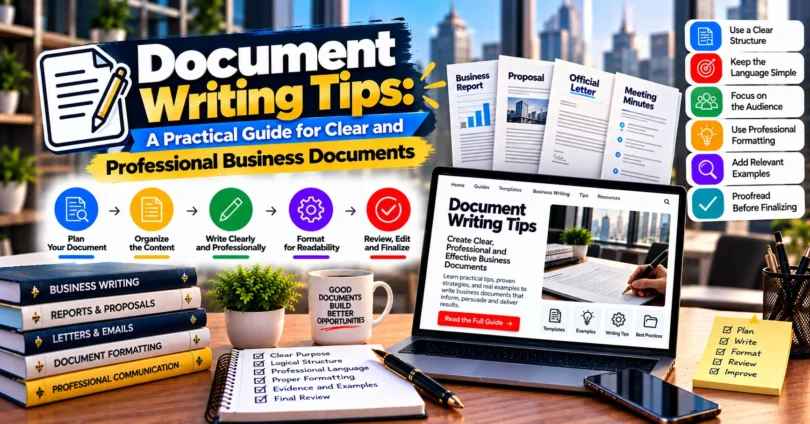

Document writing tips can help you turn scattered ideas, business information, instructions, and research into clear, professional documents that readers can understand and use. Good document writing is not simply about correct grammar. It requires planning, logical structure, appropriate language, accurate information, and careful editing.
For professionals, entrepreneurs, students, freelancers, and business teams in India, strong document-writing skills can improve communication across proposals, reports, policies, project documents, meeting notes, business plans, and client-facing material.
This guide explains practical methods for planning, drafting, formatting, reviewing, and improving documents. You will also learn common mistakes to avoid and how to make business documents easier to scan, understand, and act upon.
What Is Document Writing?
Document writing is the process of planning, drafting, organising, editing, and presenting information in a structured written format for a particular purpose and audience.
A document might be created to inform, explain, persuade, record, instruct, propose, or support a decision. Its format depends largely on what the reader needs to know and what should happen after reading it.
Common examples include:
- Business reports
- Project proposals
- Standard operating procedures
- Policies and guidelines
- Business plans
- Meeting summaries
- Client briefs
- Research documents
- Training materials
- Internal company communications
A strong document communicates its purpose quickly. A weak one may contain useful information but make readers work unnecessarily hard to find or understand it.
Why Good Document Writing Matters in Business

Good business documents reduce ambiguity and make important information easier to understand.
A proposal may influence whether a potential client considers an offer. A project brief can guide an entire team. A procedure document can help employees perform a task consistently. Poorly written versions of these documents can create unnecessary questions, delays, and misunderstandings.
It Improves Clarity
Clear writing helps readers understand what you mean without repeatedly rereading a paragraph.
For example, instead of writing:
“Necessary steps should be taken by the concerned team for the completion of the work.”
A clearer version is:
“The operations team should complete the work by Friday.”
The second version identifies responsibility and gives the reader a useful deadline.
It Creates a More Professional Impression
Documents often represent a business before a meeting or conversation happens.
Consistent formatting, accurate language, meaningful headings, and careful proofreading demonstrate attention to detail. This is particularly important in client proposals, presentations, formal reports, and partnership documents.
It Supports Better Decisions
Decision-makers usually need key facts, options, risks, recommendations, and next steps rather than unnecessary background information.
A well-structured document puts those elements where readers can find them quickly.
It Creates a Reliable Record
Business decisions, processes, responsibilities, requirements, and agreements frequently need written records.
Clear documentation gives teams something concrete to reference later rather than depending entirely on memory or informal conversations.
10 Essential Document Writing Tips
The best document writing tips focus on making information useful rather than making the writing sound complicated.
Here are ten practical principles.
1. Define the Purpose Before Writing
Before opening a blank document, answer one question:
What should this document accomplish?
The answer becomes your writing objective.
For example:
- A proposal should persuade a client to consider a solution.
- A report should explain findings and their implications.
- An SOP should show someone how to complete a process.
- A project brief should define objectives, requirements, responsibilities, and deliverables.
Without a defined purpose, documents often become longer without becoming more useful.
2. Understand Your Reader
Write according to the reader’s knowledge, needs, and expectations.
A technical team may understand specialised terminology that a new client does not. Senior management may want a concise summary, while the implementation team needs detailed instructions.
Before drafting, consider:
- Who will read this?
- What do they already know?
- What information do they need?
- What questions are they likely to ask?
- What action should they take afterward?
This simple exercise can dramatically improve relevance.
3. Create an Outline First
An outline prevents ideas from appearing in a random order.
For a typical business report, an outline might include:
- Purpose
- Background
- Current situation
- Key findings
- Analysis
- Recommendations
- Next steps
You can modify this structure according to the document.
Outlining also reveals missing information before you spend time polishing individual paragraphs.
4. Put Important Information Early
Readers should not have to search through several paragraphs before discovering the main point.
Under each heading, answer the central question first. Add explanation, evidence, examples, or qualifications afterward.
For example:
Recommendation: Move customer support enquiries into one central ticketing system.
You can then explain why the recommendation is being made, its expected benefits, possible limitations, and implementation requirements.
This answer-first approach is particularly useful for executives, clients, and readers scanning documents on screens.
5. Use Simple and Precise Language
Professional writing does not require unnecessarily difficult vocabulary.
Prefer familiar, specific words when they communicate the same meaning.
Instead of:
“Utilise the available resources for the facilitation of implementation.”
Write:
“Use the available resources to implement the plan.”
The second sentence is shorter and easier to understand without losing meaning.
6. Keep Paragraphs Focused
Each paragraph should generally develop one main idea.
If a paragraph starts discussing several unrelated subjects, separate them. Shorter, focused paragraphs improve readability, particularly in digital documents.
A useful pattern is:
Main point → explanation → example or evidence → implication
Not every paragraph needs every element, but the pattern keeps writing focused.
7. Use Headings That Explain the Content
Descriptive headings help readers navigate a document.
A heading such as Project Risks and Mitigation Measures is more useful than Other Information because readers immediately know what the section contains.
Headings should also follow a logical hierarchy:
- H1 for the main document title
- H2 for major sections
- H3 for subsections
Avoid creating unnecessary heading levels simply to make a document look more detailed.
8. Use Active Voice Where Appropriate
Active voice often makes business writing clearer because it identifies who performs an action.
Passive:
“The final report will be reviewed by the manager.”
Active:
“The manager will review the final report.”
Passive voice is not automatically wrong. It can be useful when the action matters more than the person performing it. However, active voice is usually preferable when responsibilities need to be clear.
9. Support Important Claims
Facts, figures, legal requirements, research findings, and market claims should be verified before publication.
If reliable evidence is unavailable, avoid presenting assumptions as facts.
For example, do not write:
“This strategy always increases sales.”
A more responsible statement might be:
“This strategy may improve sales when it matches customer demand, pricing, distribution, and market conditions.”
Balanced language improves credibility.
10. Edit Separately From Writing
Drafting and editing require different types of attention.
During the first draft, concentrate on communicating the ideas. During editing, examine clarity, structure, accuracy, grammar, formatting, and unnecessary repetition.
Trying to perfect every sentence while drafting can slow progress and interrupt your thinking.
A Step-by-Step Document Writing Process
A repeatable process makes document writing faster and more consistent.
Step 1: Identify the Objective
Write a one-sentence description of the document’s purpose.
For example:
“This document explains the proposed marketing campaign and requests approval for its budget.”
If you cannot describe the purpose clearly, refine the idea before drafting.
Step 2: Collect the Required Information
Gather relevant facts, requirements, dates, names, figures, references, and supporting materials.
Separate verified information from assumptions or items that still require confirmation.
This is particularly important when writing financial, legal, technical, or compliance-related documents.
Step 3: Organise the Information
Group related information together.
Decide which details belong in the introduction, main sections, recommendations, appendices, or supporting notes.
Prioritise information according to the reader’s needs rather than the order in which you discovered it.
Step 4: Build the Structure
Create headings and subheadings before writing full paragraphs.
For example, a proposal might use:
- Client challenge
- Proposed solution
- Scope of work
- Deliverables
- Timeline
- Responsibilities
- Pricing
- Terms
- Next steps
The exact structure should match the purpose of the proposal.
Step 5: Write the First Draft
Write clearly without trying to make every sentence perfect.
Focus on:
- Correct information
- Logical progression
- Complete explanations
- Reader questions
- Required actions
Leave detailed polishing for the editing stage.
Step 6: Improve Readability
Review long paragraphs, complicated sentences, repeated information, vague wording, and unnecessary jargon.
Ask whether each section could be understood by its intended reader without additional explanation.
Step 7: Check Accuracy
Verify names, dates, calculations, figures, links, references, product information, responsibilities, and other factual details.
A beautifully written document can still cause problems if its information is incorrect.
Step 8: Proofread the Final Version
Check:
- Grammar
- Spelling
- Punctuation
- Capitalisation
- Heading consistency
- Numbering
- Fonts and spacing
- Tables
- Page references
- Contact information
For important documents, a second reviewer can catch issues the original writer may overlook.
Document Writing vs Content Writing
Document writing and content writing overlap, but their priorities can differ.
| Area | Document Writing | Content Writing |
|---|---|---|
| Main purpose | Record, explain, instruct or support decisions | Inform, educate, engage or attract audiences |
| Typical audience | Teams, clients, stakeholders, management | Website visitors, customers, search users |
| Common formats | Reports, proposals, SOPs, policies | Blogs, landing pages, guides, articles |
| Structure | Often formal and process-oriented | Usually flexible and audience-oriented |
| Key priority | Clarity, accuracy and usability | Relevance, engagement and communication |
A business may need both. For example, an internal product specification requires document-writing skills, while a public article explaining that product requires content-writing skills.
How to Make Business Documents Easier to Read
Readable documents help busy readers find important information quickly.
Start with meaningful headings and concise paragraphs. Use lists for genuinely scannable information such as requirements, steps, options, or deliverables.
Use White Space Effectively
A document packed with dense text can feel difficult before the reader begins.
Spacing between sections, paragraphs, headings, lists, and tables helps separate ideas visually.
Keep Formatting Consistent
Use consistent rules for:
- Heading sizes
- Fonts
- Bullet styles
- Numbering
- Date formats
- Capitalisation
- Table design
- Terminology
Consistency makes a document easier to navigate and more professional.
Explain Acronyms and Technical Terms
Do not assume every reader knows internal terminology.
Write the complete term the first time and add the abbreviation when necessary.
For example:
“Standard Operating Procedure (SOP)”
You can use “SOP” afterward.
Practical Example of Improving Business Writing
Consider this sentence:
“Regarding the aforementioned project, it is requested that all concerned individuals provide their respective feedback at the earliest possible opportunity so the same may be reviewed.”
It sounds formal but is unnecessarily complicated.
A clearer version is:
“Please send your feedback on the project by 3 p.m. Friday so the team can review it.”
The improved sentence tells readers:
- What to do
- What the request concerns
- When to do it
- Why it matters
This illustrates an important document writing principle: clarity is more valuable than unnecessary formality.
Common Document Writing Mistakes
Many weak documents fail because of avoidable communication problems rather than serious grammar errors.
Writing Without a Clear Audience
A document written “for everyone” often serves nobody particularly well.
Identify the primary reader and write for their needs.
Using Too Much Jargon
Industry terminology can save time among specialists, but excessive jargon makes documents harder for broader audiences.
Use technical terms when they add precision, and explain them when readers may not know them.
Repeating the Same Information
Repeating a key point once for emphasis can sometimes help. Rephrasing the same idea across several sections usually makes the document longer without adding value.
During editing, remove duplication.
Hiding the Main Point
Long introductions can delay the information readers actually need.
Give readers the key answer early and provide supporting detail afterward.
Mixing Facts and Opinions
Clearly distinguish verified information from recommendations, estimates, assumptions, and personal judgement.
This is particularly important in analytical and strategic documents.
Ignoring Visual Structure
Even excellent writing becomes difficult to use when everything appears as one large block of text.
Headings, spacing, short paragraphs, lists, and appropriately designed tables can improve usability.
Skipping the Final Review
Small mistakes can have large consequences.
An incorrect date, price, client name, percentage, or responsibility assignment may be more damaging than a minor grammatical error.
Always review critical details separately.
Benefits and Limitations of Strong Document Writing
Strong writing improves communication, but good documents cannot solve every business problem.
Key Benefits
Well-written documents can:
- Reduce ambiguity
- Clarify responsibilities
- Preserve important information
- Make processes easier to follow
- Improve client communication
- Support decision-making
- Make onboarding and training easier
- Present ideas more professionally
Important Limitations
A document cannot replace missing information, poor decisions, or necessary human discussion.
Some complex subjects require meetings, demonstrations, diagrams, legal review, technical validation, or expert advice alongside written documentation.
The goal should therefore be to use documents where written communication is the most suitable tool, not to document everything unnecessarily.
Document Writing Tips for Indian Businesses and Professionals
For Indian businesses working with local and international clients, clear English is usually more useful than overly formal English.
Many organisations communicate across different industries, regions, teams, and levels of technical knowledge. Straightforward wording helps reduce misunderstandings.
Pay particular attention to:
- Clear dates rather than ambiguous numerical formats
- Correct names and professional titles
- Defined deadlines
- Currency identification when multiple currencies are involved
- Clearly stated responsibilities
- Consistent terminology
- Explanations of local abbreviations when writing for international readers
For example, instead of writing only “10/11/2026,” consider writing “10 November 2026” when international readers could interpret the numerical date differently.
A Quick Checklist Before Publishing a Document
Before sending or publishing an important document, ask:
- Is the purpose obvious?
- Is the intended reader clear?
- Does the most important information appear early?
- Are headings descriptive?
- Are sentences concise and understandable?
- Are all facts and figures verified?
- Are responsibilities and deadlines specific?
- Is formatting consistent?
- Have unnecessary repetitions been removed?
- Has the final version been proofread?
If the answer to all ten questions is yes, the document is much more likely to communicate effectively.
Frequently Asked Questions
What are the most important document writing tips for beginners?
Beginners should first define the document’s purpose and intended reader. Create a simple outline, place important information early, use clear language, and keep paragraphs focused. After completing the draft, check facts, remove repetition, improve formatting, and proofread carefully. Good document writing depends more on clarity and organisation than complicated vocabulary.
How can I make my business documents look professional?
Use consistent fonts, heading levels, spacing, bullet styles, terminology, and date formats. Keep the layout clean and avoid filling every available space with text. More importantly, ensure the information is accurate, logically organised, and easy to understand. Professional appearance helps, but clear and reliable content remains the foundation of a strong document.
Should business documents use formal language?
Business documents should generally use professional language, but professional does not mean complicated. Use respectful, direct, and precise wording appropriate for the reader. Highly formal language may be suitable for certain legal or official contexts, while everyday reports, proposals, and internal documents usually benefit from simpler language that communicates the meaning quickly.
How long should a business document be?
There is no ideal length for every business document. It should be long enough to provide the information the intended reader needs and no longer than necessary. A short project brief may require one or two pages, while a detailed report may require substantially more. Purpose, complexity, evidence, audience, and required supporting material should determine length.
How can I improve my document writing skills?
Practise writing with a clear purpose, then edit your work from the reader’s perspective. Compare complicated sentences with simpler alternatives, study well-structured professional documents, and ask whether every paragraph adds useful information. Regularly reviewing your own writing for clarity, accuracy, structure, and repetition can gradually make the process faster and more consistent.
Conclusion
Effective document writing tips share one central principle: make the reader’s job easier.
Start by defining the purpose and audience. Organise information before drafting, answer important questions early, use precise language, and structure the document with meaningful headings. Verify important facts, make responsibilities and deadlines specific, and edit the document separately from the initial drafting process.
Formatting can improve readability, but it cannot compensate for unclear thinking or inaccurate information. A professional document combines both: useful content and an easy-to-follow presentation.
For your next business document, begin with a one-sentence objective and a short outline before writing the first paragraph. That small habit can improve the clarity and direction of the entire document.